Ire Aderinokun
Future-Proof CSS
#1about 4 minutes
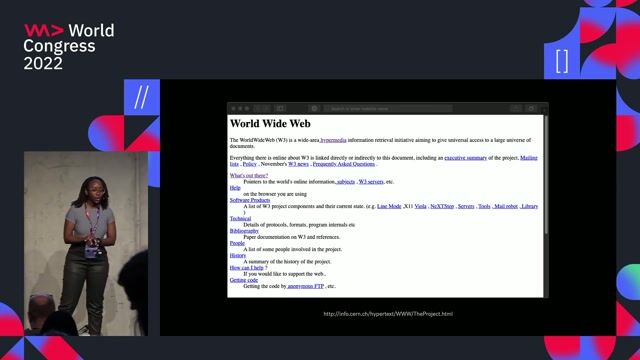
The web's foundational principle of backward compatibility
Web technologies are designed not to break older sites, ensuring longevity even for pages with deprecated or missing HTML elements.
#2about 4 minutes
Building for resilience with progressive enhancement
Progressive enhancement starts with a core experience for the least capable devices and adds features for modern browsers, unlike graceful degradation.
#3about 2 minutes
The unique challenges of progressive enhancement in CSS
Unlike JavaScript, CSS lacks robust built-in feature detection and error handling, which causes styles to fail silently without feedback.
#4about 5 minutes
Core techniques for writing robust and resilient CSS
Start with sensible HTML, leverage the cascade for fallbacks, use mobile-first media queries, and use older, well-supported properties when needed.
#5about 2 minutes
Using feature queries for progressive enhancement
Use positive @supports queries to apply modern CSS as an enhancement, ensuring a functional baseline for browsers that don't support feature queries.
#6about 6 minutes
Writing CSS for a global audience with internationalization
Adapt layouts for different languages and writing directions by using logical properties like `margin-inline-start` instead of physical ones like `margin-left`.
#7about 5 minutes
Using the right tool for the right job for accessibility
Improve accessibility by using HTML for content, CSS for styling, and JavaScript for functionality, avoiding hacks like using CSS pseudo-elements for labels.
#8about 3 minutes
Preserving accessibility when customizing default styles
When restyling default elements like buttons, ensure you provide accessible alternatives for focus states and adapt to user preferences like reduced motion.
#9about 6 minutes
Proactively auditing CSS for accessibility and compliance
Use browser developer tools like Firefox Accessibility Inspector and Lighthouse to audit for issues, but supplement them with real user testing for complete coverage.
Related jobs
Jobs that call for the skills explored in this talk.


Hubert Burda Media
München, Germany
€80-95K
Intermediate
Senior
JavaScript
Node.js
+1
Matching moments

10:00 MIN
Building resilient and performant CSS-only components
NoLoJS - Avoiding JavaScript Cruft with HTML and CSS - Aaron T. Grogg

04:56 MIN
Current challenges and the future direction of CSS
WeAreDevelopers LIVE - Yes, CSS Can Do That!

17:51 MIN
Discussion on the evolution and future of CSS
What's new in CSS for Designers?
11:50 MIN
Q&A on CSS history, design, and print standards
How to write a book with CSS

10:04 MIN
Analyzing the new Web Readiness Report and modern CSS
WeAreDevelopers LIVE - 50 years Microsoft, Web Readiness Report, The German Web Community and more

09:00 MIN
Navigating the growing complexity of modern CSS
WeAreDevelopers LIVE – You Don’t Need JavaScript, Modern CSS and More

03:47 MIN
How past browser features inform modern standards
Explore new web features before everyone else
07:46 MIN
The challenge of keeping up with modern CSS
WeAreDevelopers LIVE – AI, Freelancing, Keeping Up with Tech and More
Featured Partners
Related Videos
 28:00
28:00Can CSS recreate Tufte's designs?
Håkon Wium Lie
 40:25
40:25How to write a book with CSS
Håkon Wium Lie
 29:11
29:11Design Principles For The Web
Jeremy Keith
 43:11
43:11The State Of The Web
Jeremy Keith
 29:40
29:40Is CSS Houdini finally usable in 2023?
Tanja Ulianova
 59:20
59:20What's new in CSS for Designers?
Onur Gumus
 44:43
44:43Explore new web features before everyone else
Nikita Dubko
 1:04:00
WeAreDevelopers LIVE - Yes, CSS Can Do That!
Chris Heilmann, Daniel Cranney & Zoran Jambor
Related Articles
View all articles



From learning to earning
Jobs that call for the skills explored in this talk.


&why GmbH
Berlin, Germany
€50-70K
Junior
Intermediate
Senior
React
Next.js
TypeScript


Rr (recruitment Revolution
Manchester, United Kingdom
Remote
£35-45K
PHP
CSS
HTML
+2
Rr (recruitment Revolution
Birmingham, United Kingdom
Remote
£35-45K
PHP
CSS
HTML
+2
The World
CSS
React
Vue.js
Flutter
Angular
+1
Senior Full Stack (Front End) | Build the Future of On-Screen Discovery | 1 Day LDN | £100K + Equity
Featuresown
Senior
API
HTML
Azure
React
Node.js
+4
Brantner Digital Solutions
Charing Cross, United Kingdom
Remote
£45-65K
Senior
CSS
GIT
AJAX
+14